

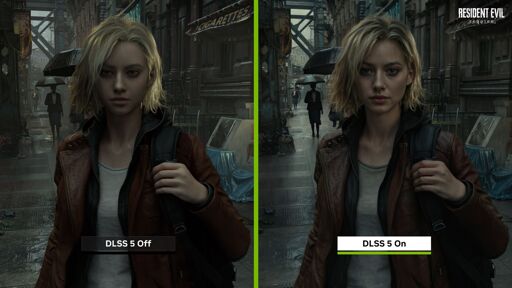
DLSS 5 is on track for a Fall 2026 debut and replaces a game’s original textures with AI-inflused versions to make them hyperreal. Or, out of one uncanny valley and into another!
DLSS 5 is on track for a Fall 2026 debut and replaces a game’s original textures with AI-inflused versions to make them hyperreal. Or, out of one uncanny valley and into another!
Not only have I done that, I overlayed one image on top of the other in GIMP to test it out with the opacity slider. Her eyes are not bigger, and the corners have not been moved up. The overlay is perfect, and transitions perfectly. I think that what you are referring to is the optical illusion of the eyes appearing to get “bigger” when they get brighter, but if you say, place it around a fixed reference, it is clear they remain the same size.
Regarding the football player, if you look at the entire scene, there’s a dark tone applied to everything, including the soccer ball. It seems to make dark scenes brighter and outdoor scenes darker. Having said that, I agree, the filter does exaggerate the skin color of the football player, but that’s what it alters, the lighting and material properties. There’s even a point where you can place the bar that the transition is seamless enough that it appears to be the same shot of the face. To test whether this was the case, I put it into GIMP, and using just the brightness slider tried to see whether I could make the colors match just from changing the brightness - and I could.
What I actually found more interesting is that in every other example, even the clothing folds remained the same - this is the only example where the folds in the clothing seem to change. Looking at the background, there’s also some evidence it’s not the same frame. I doubt it’s from a material change, it’s just that they are really one frame apart.
Without using GIMP, you can also take the football player, anyone of them, and zoom close up. Make a note of every features in their face, because it is preserved, if exaggerated.
Here’s a screen recording of me doing exactly that and getting results that do not match what you’re saying
You are working with different frames, and you are also flickering between them as opposed to using the opacity slider, which makes it difficult to see how the brightness and material effects are being altered between the two. All you need to do is gradually shift the opacity layer from the top layer once you’ve aligned them. You are actually working with the source images while I just down and dirty snipped it, gonna try getting the source image of the side by side comparison from the same frame and see if the higher definition makes a difference. I would make it a streamable, but I have no experience doing it.
Yeah, just tried it out. The ones actually from the same frame are pretty low res in comparison, but the high res ones you are choosing are from different frames, so even if you align them using the pupil as a reference, zooming out shows just how uneven they are due to minor shifts in position. Unfortunately, that means having to resort to the lower resolution alternative.
Smooth fades with the brightness upped for visibility: left eye, right eye, lips
Here are the source images for you: DLSS off and DLSS on
Streamable is just a video uploading site, you can put any video file on there for free (though it will be deleted after a while). I used OBS to screen-record, it’s free and fairly simple
Yep, got it to work (hardest part was the cropping): https://streamable.com/j0ryqe
Your images are coming from different frames. If you go to the YouTube link, you can see where they were copied from and how the idle animation distorts them. Unfortunately, they’ve only included the intro clip to the video as a side by side of the same frame. Here is your example, zoomed out - it was never going to match: https://imgur.com/a/vRu1Xxa
I mean, they’re the images that Nvidia chose to present as the comparison, but watching the video I do not see her eyes and lips growing like that in the idle animation
Imgur isn’t available in the UK, I’m afraid
With all due respect, I don’t think this shows what you think it shows. Here is that exact video downloaded, zoomed in, and brightened to clarify it: https://streamable.com/hpxx37
That’s ok, I can paste what you were trying to compare here:
I’m not seeing the relevance of your new video. This filter manipulates brightness and material at a pixel level, which my video shows at several. At the level of focus you are trying to show, there are still material differences being applied, like how light bounces of off the skin, eye, and lips, and the filter is working over detail that I already warned you the only frames that could be compared against each other are lacking.
My video already shows it applying well enough, but if try to zoom up to the pixels in an image that does not have the quality to show what it’s parting from and ignore what’s happening on the quality that can be made it, it certainly can be argued into a different story.
I think my example already does a decent job at showing that this isn’t just the typical image generation AI, so I’m afraid we’ll have to disagree from here on out, as I don’t think either can make the example to each other any more clearer. Regardless, if you are as interested as I am on this, it will be something true experts go over and point out when it gets released.
Are you trying to say that the because the frames have differently-shaped facial features, my argument that the filter changed the shapes of facial features is wrong? If not, what are you saying?
To show that even at the lower resolution, the eyes and lips are still changing shape
I’m not talking about texturing details or lighting. I’m talking about her eyes and lips being different shapes and sizes.
It’s been nice so far, thanks for the examples and the conversation. I don’t think there’s much more to add. Even though you want to keep discussing it, I feel like I’d be repeating myself just to reach an impasse. Have a good day!